
Agent skills let you teach AI coding agents — Claude Code, Cursor, Codex, Gemini CLI, and others — a new capability with a single command. The StyTrix skill turns any of those agents into a fashion design assistant: ask for a garment concept, a model, a fabric, or a whole capsule, and it generates the designs and places them live on your StyTrix canvas.
This guide shows you how to install the StyTrix skill in two minutes, connect it, and start designing — plus how it works under the hood (skill + MCP + CLI).
Install the StyTrix skill
Open your favorite agent (Claude Code, Codex, Cursor, etc.) and run:
npx skills add https://github.com/hirosichen/stytrix-skills --skill stytrix
That's it. The installer detects your agents and drops the skill into each one. A typical run looks like this:
◇  Source: https://github.com/hirosichen/stytrix-skills.git
◇  Found 1 skill
●  Selected 1 skill: stytrix
●  Installing to: Claude Code, Cursor, Codex, Gemini CLI, +60 more
◇  Security Risk Assessments
     stytrix   Safe   0 alerts
◇  Installed 1 skill  →  ./.agents/skills/stytrix
The skill is installed from the open Agent Skills format, so it works across 70+ agents — install once, use everywhere.
Connect StyTrix (one-time)
The skill drives StyTrix's tools. Connect StyTrix once, either way:
Option A — MCP connector (best for Claude.ai, Cursor, Claude Code)
Add the StyTrix MCP server:
- Claude.ai: Settings → Connectors → Add custom connector →
https://www.stytrix.com/api/mcp - Claude Code:
claude mcp add --transport http stytrix https://www.stytrix.com/api/mcp - Cursor / Codex / Gemini: add that URL to your MCP config
Option B — the StyTrix CLI (works in any terminal agent)
If your agent doesn't have MCP connected, the skill falls back to the StyTrix CLI:
npx stytrix login        # one-time browser sign-in (OAuth — no API key)
npx stytrix credits      # check your balance
Both use the same OAuth 2.1 sign-in (no API key to copy). Read-only commands are free; generation uses StyTrix credits. Full docs: https://www.stytrix.com/mcp
Start designing
Once installed and connected, just talk to your agent:
- "Generate a photorealistic concept of an oversized camel wool coat and put it on my StyTrix canvas."
- "Build an SS26 linen capsule: a model, three fabric swatches, and two looks."
- "Turn this jacket photo into a clean technical flat sketch."
- "List my StyTrix projects and how many credits I have." (free)
The agent calls the right StyTrix tools, asks your approval for anything that spends credits, and the results appear live on your canvas:
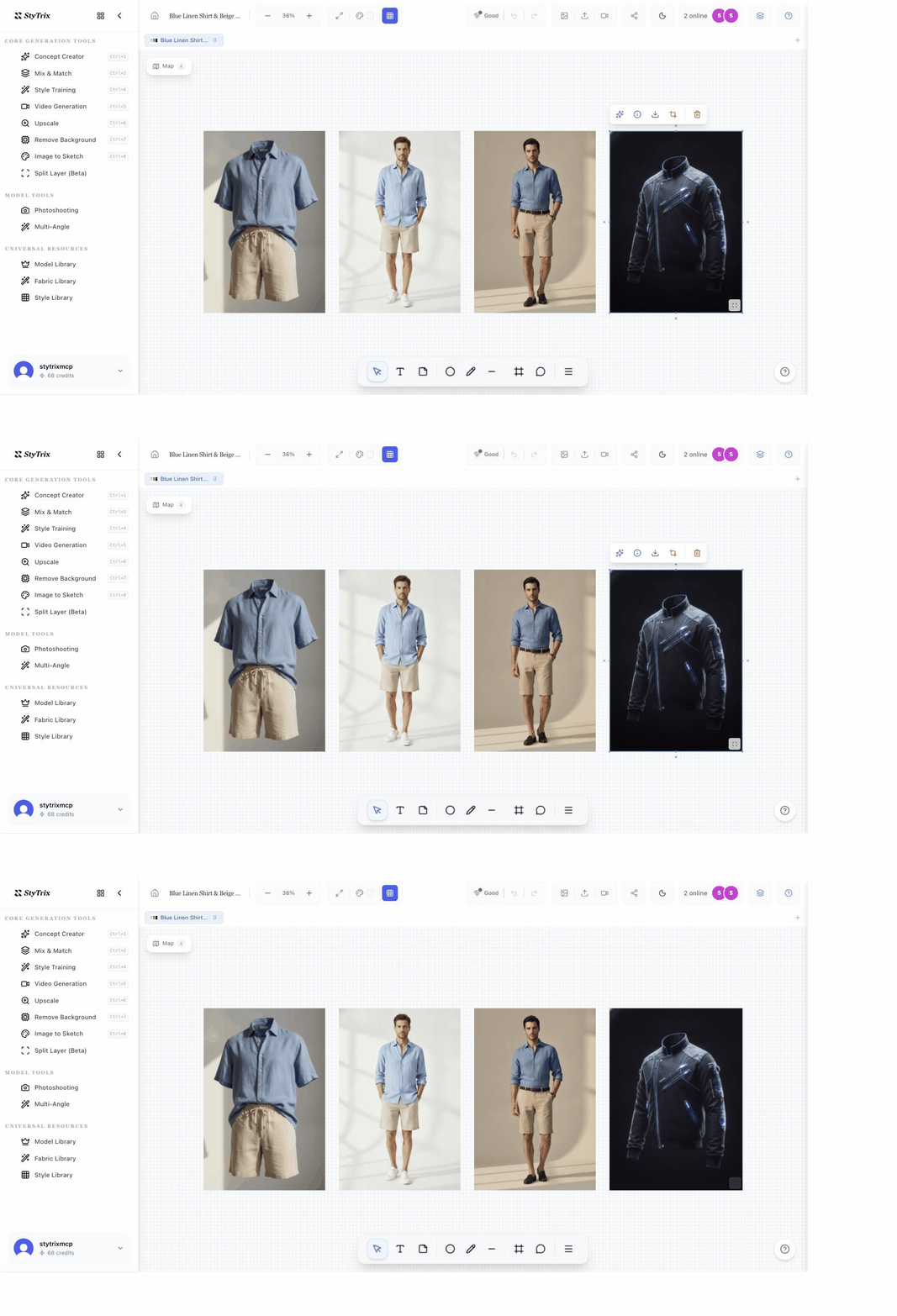
How it works: skill + MCP + CLI
Three pieces work together:
- Skill — the playbook. A small instruction package (a
SKILL.md) installed into your agent that teaches it what StyTrix is, when to use it, and the best workflows. This is whatnpx skills addinstalls. - MCP server — the tools. The StyTrix MCP server exposes 19 fashion-design tools (generate concept, model, fabric, mix & match, and more) that the agent calls at runtime.
- CLI — the fallback. The
stytrixnpm package lets the skill work in agents without an MCP connection — same OAuth, same tools, over the terminal.
You don't need all three — the skill plus either the MCP or the CLI is enough. The skill is the "brain," and the MCP/CLI is the "hands."
Frequently asked questions
What is the StyTrix skill? An installable agent skill that teaches AI coding agents (Claude Code, Cursor, Codex, Gemini CLI) to design fashion with StyTrix — generating concepts, models, fabrics, and looks on a design canvas.
How do I install it?
Run npx skills add https://github.com/hirosichen/stytrix-skills --skill stytrix in your agent.
Which agents are supported? Any agent that supports the open Agent Skills format — Claude Code, Cursor, Codex, Gemini CLI, Continue, and 70+ others.
Do I need an API key?
No. StyTrix uses OAuth 2.1 sign-in via the MCP connector or npx stytrix login.
Is it free? Installing and read-only actions are free. Generation tools use StyTrix credits.
What's the difference between the skill and the MCP server? The skill is the instructions/playbook; the MCP server provides the live tools. The skill tells the agent how and when to use the StyTrix tools well.
Start now
npx skills add https://github.com/hirosichen/stytrix-skills --skill stytrix
Then create a free StyTrix account and read the setup docs. Your AI agent is now a fashion design studio.


